


Discover how DMARC, DKIM, and SPF work together for email authentication. Learn the hidden risks of not securing your domain against email spoofing.
View More
What we keep hearing from businesses is that many assume having a backup means they’re fully protected from any disaster. But backup and disaster recovery are not the same thing, and mixing them up can leave your company exposed when it matters most.
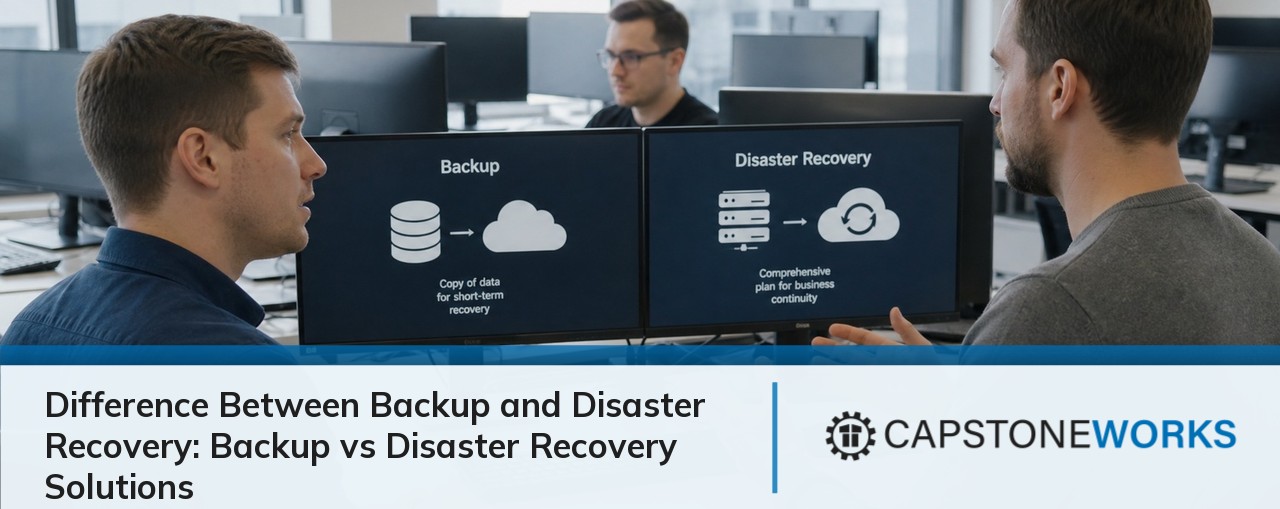
The difference between backup and disaster recovery is simple: backup saves copies of your data, while disaster recovery gets your business running again after a major disruption. Industry research shows that most teams underestimate how often recovery solutions fail to meet expectations when disaster strikes. Understanding both is key to protecting your business from data loss and downtime.
Many companies believe that a simple backup is enough to keep their business safe. In reality, backup and disaster recovery serve different purposes. Backup is about creating copies of your data so you can restore it if something goes wrong, like accidental deletion or hardware failure. Disaster recovery, on the other hand, is a complete plan to restore not just your data, but your entire IT environment and business operations after a major event, such as a natural disaster or cyberattack.
If you only have backup, you might be able to restore lost files, but you could still face days or even weeks of downtime. Disaster recovery strategies are designed to minimize recovery time and keep your business running with as little interruption as possible. That’s why both are critical parts of a strong business continuity plan.

It’s easy to overlook the details when setting up backup and disaster recovery. Here are some of the most common mistakes we see:
Many businesses think having a backup is enough. But without a disaster recovery plan, you may not be able to restore your systems quickly or completely after a disaster. This can lead to extended downtime and lost revenue.
Backing up data is important, but if you never test your recovery process, you won’t know if it actually works when you need it. Regular testing helps you catch problems before they become disasters.
Some teams don’t set clear recovery time objectives (RTOs). Without knowing how quickly you need to be back online, it’s hard to choose the right backup and disaster recovery solution for your business.
Disaster recovery isn’t just about technology—it’s about having a strategy for people, processes, and communication. Skipping this step can slow down your recovery.
Modern backup tools offer faster, more reliable recovery than older systems. If you’re still using outdated methods, you could be at risk for longer downtime and incomplete restores.
Some businesses only plan for natural disasters, but cyberattacks, hardware failures, and human error are just as common. A good disaster recovery plan covers all possible threats.
A reliable backup and disaster recovery plan offers several important advantages:

It’s important to understand that disaster recovery goes beyond simply saving your files. While data backup ensures you have copies of your important information, disaster recovery is about restoring your entire IT environment—including servers, applications, and network configurations—so your business can operate normally again.
A disaster recovery plan includes steps for restoring data, recovering systems, and communicating with employees and customers during a crisis. It also sets clear recovery point objectives (RPOs) and recovery time objectives (RTOs) to define how much data you can afford to lose and how quickly you need to be back online. Without these steps, even the best backup won’t help you recover from a major disaster.
Creating a reliable backup and disaster recovery plan involves several key steps. Here’s how to get started:
Start by reviewing your existing data protection measures. Identify what data and systems are most critical to your business, and where your current backup or disaster recovery solution might fall short.
Set clear recovery point objectives (RPOs) and recovery time objectives (RTOs). This helps you decide how often to back up your data and how quickly you need to restore operations after a disaster.
Select modern backup tools and disaster recovery services that fit your business needs. Consider cloud backup for offsite protection and faster recovery times.
Write down every step of your disaster recovery plan, including who is responsible for each task. Make sure everyone on your team knows their role during a crisis.
Schedule regular tests of your backup and disaster recovery plan. This ensures your recovery process works as expected and helps you find any gaps before a real disaster occurs.
As your company changes, review and update your backup and disaster recovery plan to keep it effective. New systems, applications, or regulations may require adjustments.

When putting a backup and disaster recovery plan in place, start by identifying your most critical data and systems. Focus on what your business needs to operate each day, and make sure those assets are protected first. This approach helps you prioritize resources and avoid unnecessary costs.
Next, consider how often your data changes and how quickly you need to recover after a disaster. For some businesses, losing a few hours of data is acceptable; for others, even a few minutes of downtime can be costly. Choose backup and recovery solutions that match your specific needs, and make sure your team knows how to use them.
Finally, don’t forget about compliance and data protection requirements. Depending on your industry, you may need to follow specific rules for storing and recovering data. Work with your IT provider to ensure your backup and disaster recovery plan meets all necessary standards.
Following these best practices can help you build a more effective backup and disaster recovery plan:
Taking these steps will help you avoid common pitfalls and keep your business protected.

Are you a business with 25-75 employees looking for a reliable way to protect your data and keep your operations running smoothly? As your company grows, the risks of data loss and downtime increase, making it more important than ever to have a solid backup and disaster recovery plan in place.
We understand the difference between backup and disaster recovery and can help you build a solution that fits your needs. Our team at Capstone Works, Inc. specializes in designing, implementing, and managing backup and disaster recovery strategies for businesses like yours. Contact us today to learn how we can help safeguard your business.
The main difference is that backup creates copies of data for safekeeping, while disaster recovery is a complete plan to restore your IT systems and operations after a disruption. Backup alone does not guarantee quick recovery from a disaster, but disaster recovery includes steps for restoring systems, applications, and data so your business can resume normal operations. Both are needed for full data protection and business continuity.
You should review and update your disaster recovery plan at least once a year or whenever you make major changes to your IT environment. This ensures your plan stays current with new systems, applications, or regulations. Regular updates also help you address new threats, such as cyberattacks or changes in business processes, keeping your recovery solutions effective.
Backup and disaster recovery services work together to protect your business from data loss and downtime. Backup alone might help you restore lost files, but disaster recovery ensures your entire IT environment is restored quickly after a major event. Using both helps you meet recovery time objectives and maintain business continuity.
A disaster recovery plan should include a list of critical systems and data, clear recovery point objectives, and detailed steps for restoring operations. It should also assign roles and responsibilities to team members and include communication plans for employees and customers. Testing and updating the plan regularly is essential for effective disaster recovery.
Cloud backup provides off-site storage for your data, making it easier to recover from disasters that affect your physical location. It supports disaster recovery strategies by enabling rapid recovery and reducing the risk of data loss from local failures. Cloud solutions also scale with your business, offering flexible protection as your needs change.
Common challenges include not testing backups, using outdated technology, and failing to document recovery procedures. Businesses may also struggle with meeting recovery time objectives or protecting against all types of disasters. Addressing these issues helps ensure your backup and recovery solutions work when you need them most.


Discover how DMARC, DKIM, and SPF work together for email authentication. Learn the hidden risks of not securing your domain against email spoofing.
View More
Discover how an IT security risk assessment can expose legal risks if findings are ignored. Learn the importance of follow-through in risk management.
View More


.svg)


