



Discover how an IT security risk assessment can expose legal risks if findings are ignored. Learn the importance of follow-through in risk management.
View More
When your domain lacks a DMARC record, attackers can impersonate your business and email your customers directly—without you ever seeing the attack. This silent risk can damage your reputation and email deliverability, even if your own inbox stays clean.
When a company's domain has no DMARC record, no SPF entry, and no DKIM signature, nothing stops a stranger from sending email that looks like it came from that business. Customers get the fake invoice, not the company — and the company is usually the last to know.
That blind spot is the real cost of skipping email authentication: not spam in your own inbox, but damage done in your name, to people who trust you, without your knowledge.
Fixing it means understanding how DMARC, DKIM, and SPF work as a set rather than treating any one of them as sufficient on its own. Skip the setup, and the damage being done under your name can run for months before anyone on your team notices.

Attackers don't always want into your inbox — often what they want is your name, so they can use it against the people who trust it. A domain with no authentication in place is the easiest version of that trick to pull off, since nothing stops a forged message from looking exactly like the real thing.
The result is called email spoofing, and it plays out as fake invoices, phishing links, or malware that all appear to come from your business. Because these messages never pass through your own systems, you won't see them — which means the first sign of trouble is often a customer who no longer trusts your name in their inbox.
Even a domain with no history of attack carries this exposure, since attackers specifically hunt for domains without DMARC records because they're the path of least resistance. Once spoofing starts, the fallout compounds: brand credibility slips, and legitimate messages you actually sent begin landing in spam right alongside the fakes.
DMARC, DKIM, and SPF are three separate protocols, and the protection only holds when they're working as a set rather than alone. Each one checks a different part of the message, and together they close the gaps that a single check would leave open.
Put all three in place and a forged email has almost nowhere to hide; leave even one out, and that gap is exactly where abuse gets in.
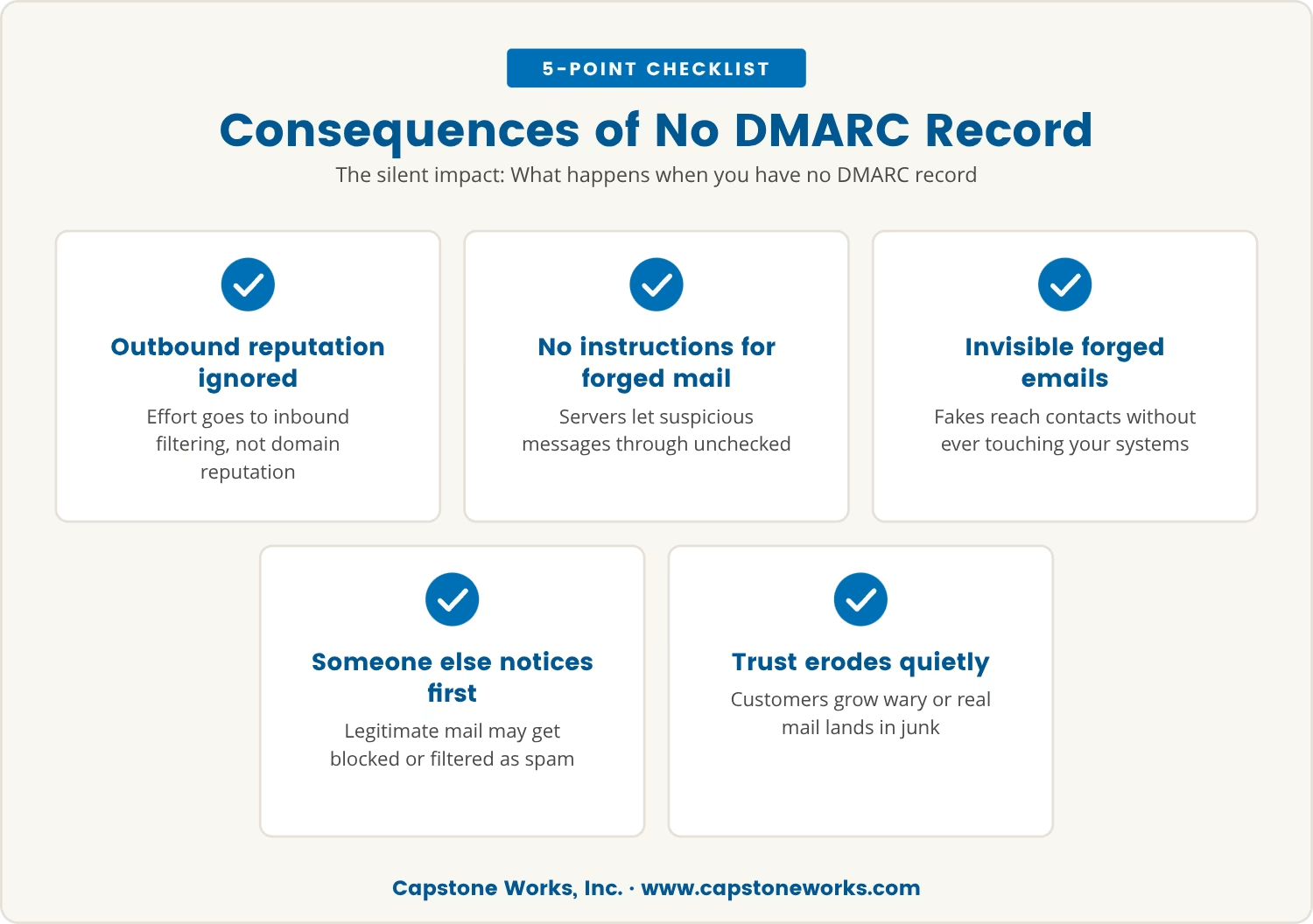
Many businesses in Cedar Park spend their effort blocking unwanted mail from reaching their own inboxes, while the easier target — their domain's outbound reputation — goes unwatched. Without a DMARC record, receiving servers have no instructions for handling a suspicious email that claims to be from your domain, so they simply let it through.
That means forged emails can reach your customers, partners, or vendors without triggering any warning at all, and because they never touch your own systems, you won't see them. The first sign of a problem is usually someone else telling you about it, or your own legitimate mail starting to get blocked or filtered as spam.
The damage tends to build quietly before it becomes obvious. Customers grow wary of messages that used to be routine, or your real emails start landing in junk folders alongside the fakes. Left alone, that erosion makes every future message to the people who matter harder to deliver and harder to trust.
Impersonation rarely announces itself — it shows up sideways, in signals that look like unrelated problems until you connect them. Watch for:
Any one of these on its own is worth a second look; together, they're reason enough to check your email authentication setup for missing or misconfigured records right away.
A common assumption is that SPF and DKIM alone cover email spoofing protection, but neither one tells a receiving server what to actually do with a message that fails. That instruction only exists once a DMARC record is in place.
Even companies that have set up SPF or DKIM often stop there, as though the job were finished, but an attacker can still send a message that slips past one check while failing the other. DMARC closes that gap by requiring the two to align and by spelling out exactly what should happen when they don't.
A related mistake is landing on a DMARC policy of "none" and stopping there — it reports on suspicious mail without blocking or quarantining any of it. Real protection means tightening that policy in stages as confidence in the setup grows.
On top of that, DNS records often get left behind when a business switches email providers or adds a new service, and each of those overlooked updates is a fresh gap for attackers to use.
Spoofing doesn't stay contained to the fake messages themselves — it bleeds into how every real message from your domain gets treated. Email providers track the reputation of sending domains, so once yours is flagged for suspicious activity, legitimate mail from that same domain can start failing SPF checks or landing straight in spam.
That shift doesn't just block a few messages; it chips away at your ability to reach customers at all, translating into lost sales, missed opportunities, and strained relationships. A customer who's been burned by one fake email often starts treating every message from your business with the same suspicion, including the ones that genuinely matter.
Left unaddressed, the gap between reputation and reality only widens, and reputations get harder to repair the longer they sit damaged. That's the case for checking regularly whether email from your domain is properly authenticated and for keeping an eye on your DMARC reports as routine, not an afterthought.
Fixing the gap starts with a clear-eyed look at what's actually in place today, then closing it step by step:
Worked through in order, these steps close the exact gaps attackers rely on, and keep your business communications secure against abuse you'd otherwise never see.
Most security effort goes toward stopping inbound threats, which is exactly why outbound domain abuse slides under the radar so easily. The damage happens outside your own inbox, so there's rarely a clear signal that a problem exists until the trust it's cost has already shown up somewhere else.
For companies with 25 to 75 employees, that delayed signal tends to hit harder, because a single spoofing incident can undo years of trust built with customers and partners in one stroke. In Cedar Park, where word about a business travels fast, that trust is one of the most valuable things a company has to protect.
Recognizing what a missing DMARC record actually exposes is the first step; acting on it is what keeps your reputation intact and your messages landing where they're meant to.

Many organizations with 25 to 75 employees don’t realize their domain could be used for outbound email spoofing until it’s too late. At Capstone Works, Inc., we understand how easily this risk can go unnoticed and how damaging it can be for your reputation.
We invite you to see how we approach email authentication and help businesses like yours close these gaps before they become a problem.
Try our services risk-free: if you’re not satisfied after 60 days, we’ll refund 100% of your fees.
Online tools can look up your domain's DNS TXT records and confirm whether a DMARC record exists. Enter your domain name into a DMARC checker, and it will show the record, if one exists, along with the policy currently in place. No record showing up means the domain has no protection against unauthorized use.
SPF tells receiving mail servers which servers are allowed to send email for your domain, while DKIM adds a digital signature to each message confirming it hasn't been altered and comes from an authorized sender. Strong email authentication requires both working together, not either one alone.
An SPF record only works if it lists every server and service sending mail on your domain's behalf. Add a new email provider or third-party tool without updating that record, and mail from it will fail the SPF check. Reviewing the SPF record regularly keeps it accurate as your services change.
A DMARC policy tells receiving servers exactly what to do when a message fails SPF or DKIM, whether that's monitoring it, quarantining it, or rejecting it outright. That instruction is what keeps attackers from successfully sending fake mail under your domain's name, protecting both your customers and your reputation.
Start by confirming SPF, DKIM, and DMARC are all correctly configured, then move to a stricter DMARC policy where possible. Let customers know about the incident and advise caution with unexpected emails, while monitoring DMARC reports to track any ongoing abuse and working with an IT provider to resolve it.


Discover how an IT security risk assessment can expose legal risks if findings are ignored. Learn the importance of follow-through in risk management.
View More

Explore the benefits of IT outsourcing, including improved support coverage and access to specialized expertise, to enhance your business operations.
View More


.svg)


