


Discover how DMARC, DKIM, and SPF work together for email authentication. Learn the hidden risks of not securing your domain against email spoofing.
View More
One thing we notice again and again is that many businesses think their firewall is set up and then forget about it—until something goes wrong. "A firewall is only as strong as its configuration and ongoing management." Industry research shows that misconfigured firewalls are a top cause of network breaches, yet most teams underestimate how often these mistakes happen.
So, what is a firewall, and why does it matter so much? A firewall is a network security device that acts as a barrier between your internal network and the outside world. It monitors incoming and outgoing network traffic based on pre-set security rules, helping to block malicious traffic and unauthorized access. Whether you’re running a small office or a large data center, having the right firewall solution in place is essential for protecting your business from potential threats and keeping your private network safe.
Firewalls can also be hardware, software, or a mix of both. Their main job is to inspect each data packet that tries to enter or leave your network. By checking details like source and destination IP addresses, port numbers, and the type of application, firewalls allow or block traffic based on your security policies. This helps prevent malware, cyber attacks, and other advanced threats from reaching your internal network.
A firewall acts as the first line of defense in your network security solution. It’s not just about blocking bad traffic—firewalls offer visibility into your network connections and help you enforce access control. With the right firewall configurations, you can protect sensitive data, improve network performance, and adapt to the changing threat landscape.

Even with the best intentions, many businesses make avoidable mistakes with their firewall setup. Here are some of the most frequent issues and how you can steer clear of them.
Many firewalls come with default security rules that aren’t strong enough for most businesses. If you don’t customize your firewall configuration, you risk leaving open doors for attackers. Always review and update your settings to match your actual needs.
Firewalls need updates to stay effective against new threats. Skipping firmware or software updates can leave your network exposed to malware and advanced threat tactics. Set a schedule to check for updates and apply them promptly.
It’s common to focus on blocking incoming threats, but outgoing network traffic-based threats matter too. If malware gets inside, it may try to send data out. Make sure your firewall filters both incoming and outgoing traffic.
A flat network makes it easier for threats to spread. Using firewall rules to segment your internal network helps contain potential threats and limits damage if a breach occurs.
Logs provide valuable insight into what’s happening on your network. If you don’t monitor them, you might miss signs of unauthorized access or malicious activity. Set up alerts for suspicious behavior and review logs regularly.
It’s tempting to make exceptions for convenience, but each one can weaken your firewall protection. Only allow exceptions when necessary and review them often.
As your business grows, your firewall needs may change. Failing to plan for increased network traffic or new applications can lead to performance issues or security gaps. Choose a firewall solution that can scale with you.
Every reliable firewall should have a few core features. Here’s what to look for:

There are several different types of firewalls, each with its own strengths. Understanding these options helps you pick the best fit for your business.
Traditional firewalls, sometimes called packet-filtering firewalls, check basic information like IP address and port numbers. They’re simple but may not catch more advanced threats. Stateful inspection firewalls keep track of active connections, offering more control and better security.
Next-generation firewalls (NGFWs) add features like deep packet inspection, intrusion prevention, and application awareness. These are ideal for businesses that need advanced protection and visibility into their network traffic. Proxy firewalls act as intermediaries, inspecting traffic at the application level and hiding your internal network from outsiders. Virtual firewalls are software-based and work well in cloud or hybrid environments, providing flexible security for dynamic workloads.
No matter which type you choose, make sure it supports your business goals and can adapt to changes in your network environment.
A network firewall is more than just a barrier—it’s a system with multiple parts working together. The main components include firewall filters, security operations tools, and monitoring systems. These elements help you enforce access control, block malicious traffic, and maintain network performance.
Firewalls use a combination of predefined and custom security policies to decide what traffic is allowed or blocked. They inspect each data packet, looking for signs of malware, unauthorized access, or other potential threats. Some firewalls also use advanced threat detection, like deep packet inspection and real-time threat intelligence, to spot new attack methods.
Effective firewall deployment means placing your firewall at key points in your network, such as between your internal and external networks or in front of sensitive data centers. This setup helps protect both your users and your critical business resources.
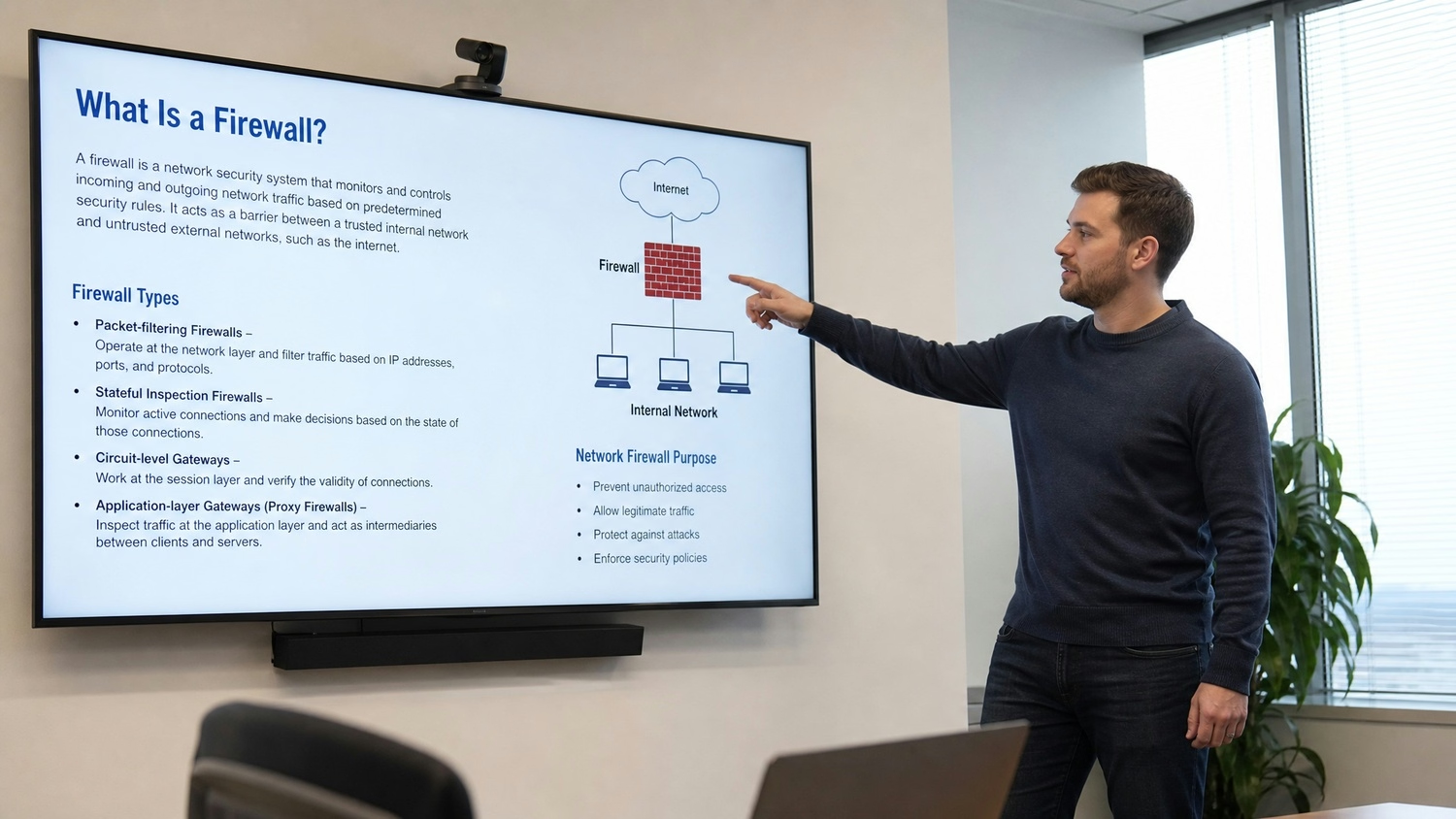
Firewalls use filters to control which traffic can enter or leave your network. These filters are based on rules you set—such as blocking certain IP addresses, port numbers, or types of applications. Here’s how different filters work together to keep your network secure.
Packet filtering is the simplest form of firewall filtering. It checks the source and destination IP, port numbers, and protocol type. If the packet matches an allowed rule, it passes through; otherwise, it’s blocked.
Stateful filtering goes a step further by remembering active network connections. This helps the firewall make smarter decisions about which packets belong to safe, established sessions and which might be suspicious.
Application-level filters inspect the actual content of data packets. This is useful for blocking specific web applications or preventing certain types of files from being downloaded.
Some firewalls can filter traffic based on website URLs or keywords. This helps block access to malicious or inappropriate sites and reduces the risk of malware infections.
Intrusion prevention filters look for patterns that match known attack methods. If a match is found, the firewall can block the traffic and alert your team.
You can create custom filters to address unique business requirements, such as allowing only certain devices to access sensitive resources or blocking traffic from specific countries.
Deploying a firewall solution is more than just plugging in a device. Start by assessing your network’s needs—consider your size, the types of data you handle, and your compliance requirements. Choose a firewall that matches your technical and business goals.
Next, plan your firewall configuration carefully. Define clear security rules, set up monitoring and alerting, and regularly review your settings. Test your firewall before going live to make sure it doesn’t disrupt network performance or block legitimate business applications.
Ongoing management is key. Schedule regular reviews of your firewall configurations, update firmware and software, and adjust policies as your business grows. Don’t forget to train your team on how to respond to alerts and potential threats.
To get the most from your firewall, follow these proven best practices:
Following these steps helps ensure your firewall protection stays strong as your business evolves.

Are you a business with 25-75 employees looking for a reliable firewall solution? If your company is growing, you need more than just basic protection—you need a system that adapts to your needs and keeps your data safe.
Our team at Capstone Works, Inc. specializes in firewall security and network security solutions. We help you choose, configure, and manage the right firewall for your business. Contact us today to find out how we can help you stay secure and focused on what matters most.
A firewall is a general term for any device or software that controls traffic between networks, while a network firewall specifically protects your entire network from external threats. Network firewalls are often used at the edge of your business to block malicious traffic and enforce access control.
Network firewalls can also include advanced features like intrusion prevention and threat intelligence. These tools help monitor network connections and keep your internal and external environments safe from potential threats.
Choosing the right type of firewall depends on your network size, the data you handle, and your security needs. Options include hardware firewalls, software firewalls, and next-generation firewalls (NGFWs).
Each type offers different firewall features, such as deep packet inspection or application-level filtering. Consider your business goals and consult with IT experts to make the best choice for your environment.
A next-generation firewall (NGFW) goes beyond traditional firewall capabilities by adding features like intrusion prevention, application awareness, and advanced threat detection. NGFWs provide deeper visibility and control over your network traffic.
These firewalls offer better protection against modern cyber threats and can adapt to changes in your network environment. They are especially useful for businesses that need to secure sensitive data and complex applications.
Firewall configuration is critical for effective firewall protection. Poorly configured firewalls can leave gaps that attackers exploit, while well-planned settings block unauthorized access and malicious activity.
Regularly reviewing and updating your firewall configurations helps ensure your network security device is working as intended. Always test changes to avoid disrupting business operations.
Firewall filters are rules that determine which traffic is allowed or blocked. They inspect data packets based on criteria like source and destination IP, port numbers, and application type.
Using firewall filters, you can customize your security policies to fit your business needs. This helps prevent unauthorized access and maintain strong network security.
Firewall deployment should be at key points in your network, such as between your internal network and the external network. Placing firewalls at these locations helps block malicious traffic before it reaches your critical resources.
Consider using multiple firewalls for layered protection, especially if you have a data center or handle sensitive information. This approach improves your overall security posture.


Discover how DMARC, DKIM, and SPF work together for email authentication. Learn the hidden risks of not securing your domain against email spoofing.
View More

Discover how an IT security risk assessment can expose legal risks if findings are ignored. Learn the importance of follow-through in risk management.
View More


.svg)


